

Present Continuous Game: A Teacher’s Guide to Planet Zeta

A student can name an action and still leave an important word out of a sentence: “The robot fixing the machine.” A useful present continuous game gives students repeated opportunities to connect the subject, the correct form of be, and an -ing verb.
Mission to Planet Zeta puts that practice inside a space-station adventure. Students join Pip and Nova, investigate mixed-up action reports, complete seven interactive challenges, and collect clues to help a supply shuttle dock safely. Here is how to make the mission part of a purposeful grammar lesson.
What is Mission to Planet Zeta?
Mission to Planet Zeta is an online grammar mystery from Hot Chocolate Teachables for students in Grades 2–4. Its focus is the present continuous tense, also called the present progressive: using am, is, and are with an -ing verb to describe actions happening now.
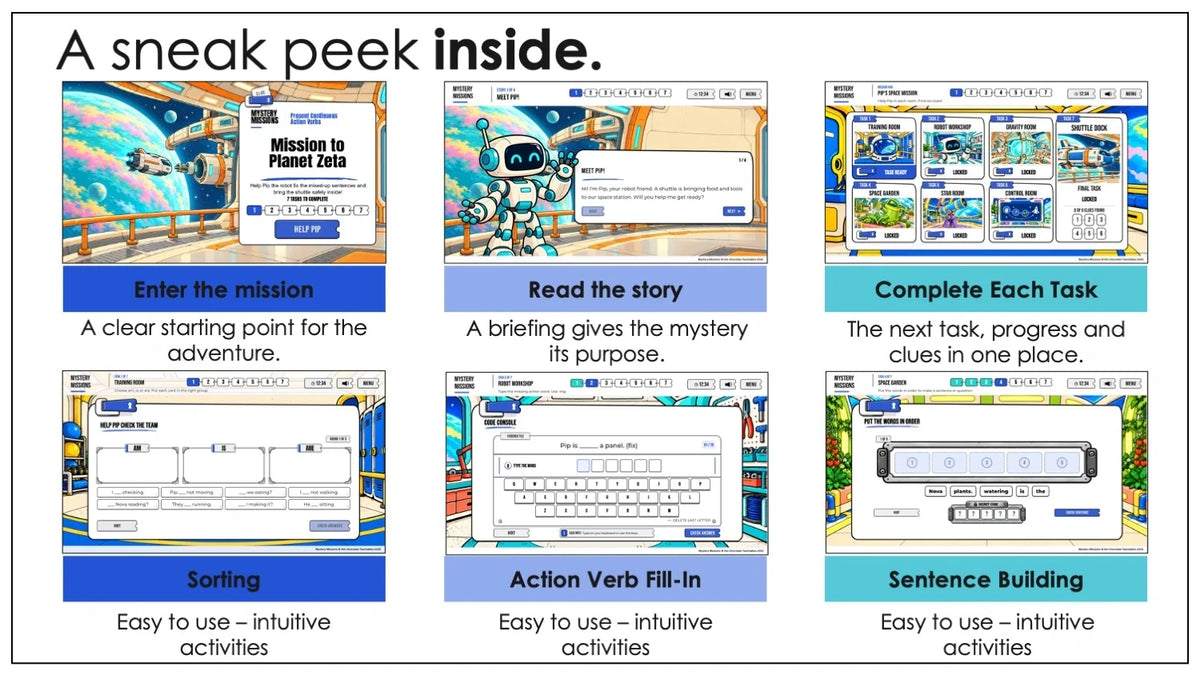
The story takes learners through the Training Room, Robot Workshop, Gravity Room, Space Garden, Star Room, and Control Room before the final Shuttle Dock activity. Short story sections connect the challenges, and collected clues lead to a final code challenge.
Allow about 35 minutes for gameplay, depending on reading level and pace. Add time for joining the session, reviewing the language, and discussing answers. The suggested grades are a starting point; consider reading ability and English proficiency when choosing support.
Which present continuous skills do students practice?
Choosing am, is, or are
The first decision is matching the subject with the correct helping verb. Students practice I am, he/she/it is, and you/we/they are. Encourage learners to identify the subject before they choose a verb, especially when a sentence uses a name or a noun phrase.
Building statements, negatives, and questions
The mission includes affirmative statements, negative sentences, and questions. Students need to notice both the words and their order. The examples below are suggested teacher-created warm-up sentences, rather than quoted questions from the game.
| Sentence type | Example for your board | What to notice |
|---|---|---|
| Statement | The robot is carrying a box. | Subject + is + -ing verb. |
| Negative | The robot is not carrying a box. | Not follows the helping verb. |
| Question | Is the robot carrying a box? | Is moves before the subject. |
Spelling the -ing form
Planet Zeta also practices spelling changes such as make → making and run → running. Before students play, review these alongside a straightforward example such as look → looking. Ask learners to explain the change they see instead of treating every verb as “just add -ing.”
What happens during the digital escape room?
The seven challenges use different activity formats to revisit the same grammar focus. Students sort sentences by am, is, and are, type missing action words, choose answers along a route, arrange words into sentences, read short passages, decode clues, and investigate an illustrated scene.
These formats give you several things to observe. A learner may choose the correct helping verb in a sorting activity but need support when building a complete sentence. Another may understand a picture while overlooking a negative in the written question.
Ask students to explain a choice when you check in: “Which word tells you to use are?” or “How did you know this question was asking about something happening now?” Use those conversations to decide what to revisit after the adventure.
How to set up Planet Zeta for your class
- Activate your purchase. Follow the instructions in the purchase PDF, enter the supplied activation code, and verify your teacher email.
- Open the mission in your teacher dashboard. Review the resources, progress-monitoring settings, and optional time limit.
- Generate a classroom code. Share that code and the student-page address provided in your dashboard.
- Help students join. Learners enter the classroom code and choose a nickname or team name. Student email accounts are not required.
A classroom code stays active for 72 hours from creation. Check its deadline before planning a session across multiple days. A new code starts a new session; progress from an expired code does not transfer. This classroom window does not expire your purchased teacher license.
Use a desktop computer, laptop, Chromebook, or compatible tablet in landscape with an internet connection. No app installation is required, and phones are not supported for gameplay. Test your classroom device and network before the lesson. The How It Works guide and setup and troubleshooting page explain the access process.
A teacher-friendly lesson plan for present progressive practice
Before the game: a five-minute action warm-up
Try this suggested classroom activity: perform a familiar action, such as writing, reading, or walking. Ask students to describe it in a full sentence. Write one response and underline the helping verb and the -ing form.
Next, change the subject: “I am writing,” “She is writing,” and “They are writing.” Briefly model a negative and a question. Keep the warm-up focused on language students will need, and preview unfamiliar space vocabulary that appears in the product previews.
During the game: choose a participation format
- Independent practice: Give each student a compatible device when they are ready to read directions and make decisions independently.
- Partner practice: One student reads while the other explains the answer; both agree before entering it. Switch roles regularly.
- Whole-class practice: Display the game through a compatible computer connected to an interactive whiteboard. Give everyone thinking time before inviting an answer.
For a shared screen, ask students to prepare answers on paper or discuss them with a partner. This gives more learners a chance to use the grammar while one person controls the game.
After the game: check independent understanding
Use a new picture or a simple classroom action for a suggested exit task. Ask students to write one affirmative sentence, change it into a negative, and then form a question. Review the helping verb, word order, and -ing spelling separately. Allow extra lesson time for this check; the gameplay estimate does not include it.
Support ESL learners and adjust the challenge
For students who need a reference, provide a small I am / he, she, it is / you, we, they are chart. Read the opening directions together, check the meaning of a few essential action verbs, and use partners when reading demands would otherwise distract from the grammar.
When a student makes an error, narrow the question: “Who is doing the action?” Then ask, “Which helping verb matches?” This keeps the feedback connected to the language rather than simply supplying an answer.
For students ready to extend their learning, ask them to explain a correction or create a new question about a classroom scene. These are suggested teacher-led extensions. Choose whether to use the optional timer according to your students’ needs; leave enough space for reading and discussion.
Use the printable worksheets for follow-up practice
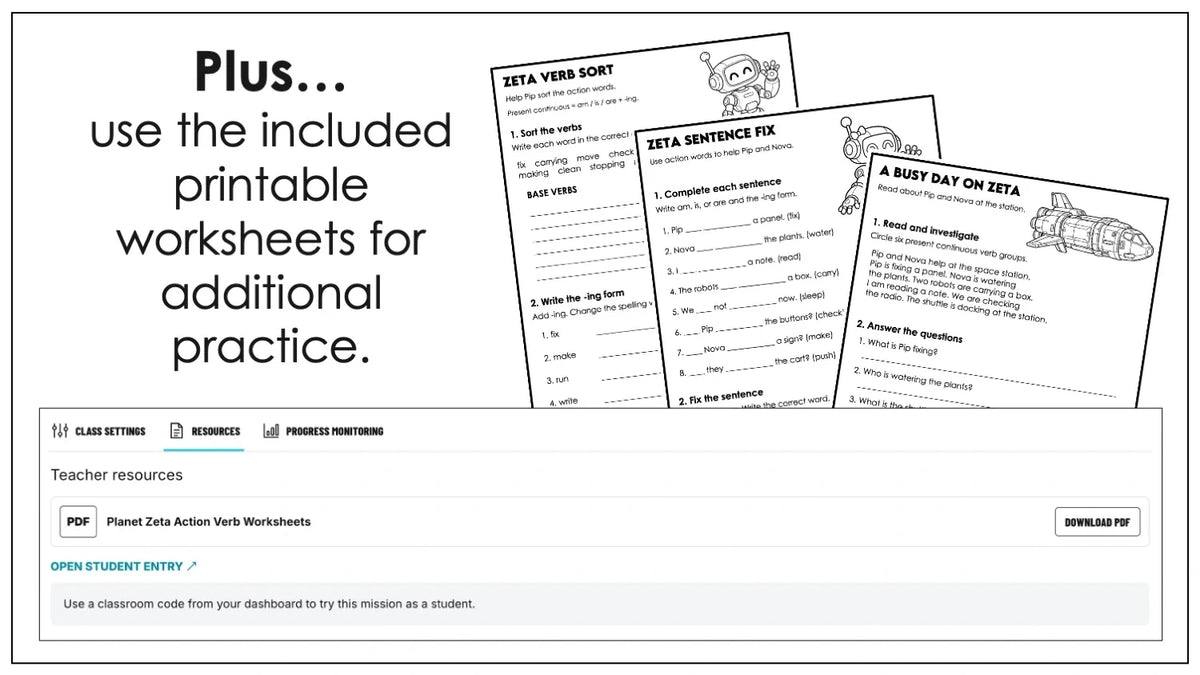
Planet Zeta includes three optional printable present continuous worksheets and an answer key. The activities cover base verbs and -ing forms, completing and correcting sentences, reading about Pip and Nova, and writing sentences using verbs from the mission.
Download the materials from the teacher resources area. You might select a page that addresses an error you noticed during play, use a worksheet for the next lesson’s review, or combine a short written task with an oral explanation. The printables provide an additional way to work with the language away from the screen.
New to the series? Start with our teacher’s guide to Mystery Missions for an overview of the platform.
An optional tool for classroom discussion
As an Amazon Associate I earn from qualifying purchases. This post contains affiliate links. I may earn a commission at no extra cost to you.
If you add a separate team sentence-building review, Learning Resources Recordable Answer Buzzers can signal a team’s turn. Give thinking time before inviting a statement, negative, or question. This optional routine happens around the lesson; the online mission does not require buzzers.
Frequently asked questions about Planet Zeta
Is present progressive the same as present continuous?
Yes. Both names describe the grammar focus in this mission. Use the term your students already know and explain the alternative name when needed.
Can I use this game before teaching the tense?
Introduce the basic structure and model a few examples first. The mission is useful for practice and review; learners who are new to the language may need teacher-led play and a reference chart.
Do students need separate accounts?
No. Students join with the classroom code and a nickname or team name. The teacher uses email verification to access the teacher dashboard.
Can I monitor students during the mission?
The teacher dashboard offers progress monitoring. Check the relevant settings before starting, and combine that information with students’ explanations and a short independent follow-up task.
Plan your next space-themed grammar lesson
Choose Planet Zeta when your class needs practice connecting subjects, helping verbs, and actions within complete sentences. Preview the activities, prepare the language support your learners need, and leave time to talk about their choices.
Explore Mission to Planet Zeta and view the product previews. You can also find the mission on the Mystery Missions marketplace or view its Teachers Pay Teachers listing.


