

What Are Mystery Missions? A Teacher’s Guide to Digital Grammar Games

Mystery Missions are online English learning adventures that combine focused grammar practice with an illustrated story. Students complete seven interactive challenges, collect clues, and use their discoveries to solve a final mystery. Teachers activate a purchased mission, share a classroom code, and follow class progress from a teacher dashboard.
For an English lesson, that means a grammar goal can become part of a bigger task: help at a space station, follow a pirate map, investigate a missing spellbook, or put a mixed-up zoo back in order. Students have a reason to read the next instruction and think about their answer because it moves the adventure forward.
This guide explains what the Mystery Missions series is, what students practice, and how to use these digital grammar games in an elementary or ESL classroom.
What are Mystery Missions?
Mystery Missions are a series of story-based digital learning games from Hot Chocolate Teachables. Each mission connects a particular English skill with a themed adventure. The current missions focus on past tense verbs, present continuous verbs, prepositions of place, and singular and plural nouns.
Students follow a story, work through interactive activities, and discover clues along the way. The clues connect the challenges to the final mystery, giving the separate grammar tasks a shared purpose.
You may also see the activities described as digital grammar escape rooms. Students play in a browser and work toward a final challenge; you do not need to set up a physical escape room or buy locks and props. The purchase PDF supplies the activation instructions for the online mission. Additional printable resources depend on the mission.
What do students practice in these digital grammar games?
A clear grammar skill
Each mission has a specific language focus. For example, a present continuous mission gives students practice connecting am, is, and are with an -ing verb. A plural noun mission asks learners to notice the difference between one item and more than one, including changes in spelling.
This makes the series useful for targeted review after you have introduced the language. Choose the skill your class needs to revisit, then use the mission as another opportunity to recognize and apply it.
Reading with a purpose
Students need to understand instructions, read short story sections, and look carefully at the information in a challenge. A familiar word on its own may not be enough: learners also need to consider the sentence or picture around it.
For ESL learners, previewing a few essential words can help keep the main challenge focused on the grammar. Reading support can also be provided through partner work or a teacher-led activity.
Explaining choices and using clues
The mystery format gives you opportunities to ask, “What helped you decide?” Students can point to a subject, a verb ending, or a detail in a picture as they explain an answer. In pairs, they can discuss a choice before one student responds on screen.
These conversations are teaching opportunities you can add around the game. Finishing a mission shows progress through the activity; a separate speaking or writing task helps you check whether students can use the language independently.
How do Mystery Missions work for students?
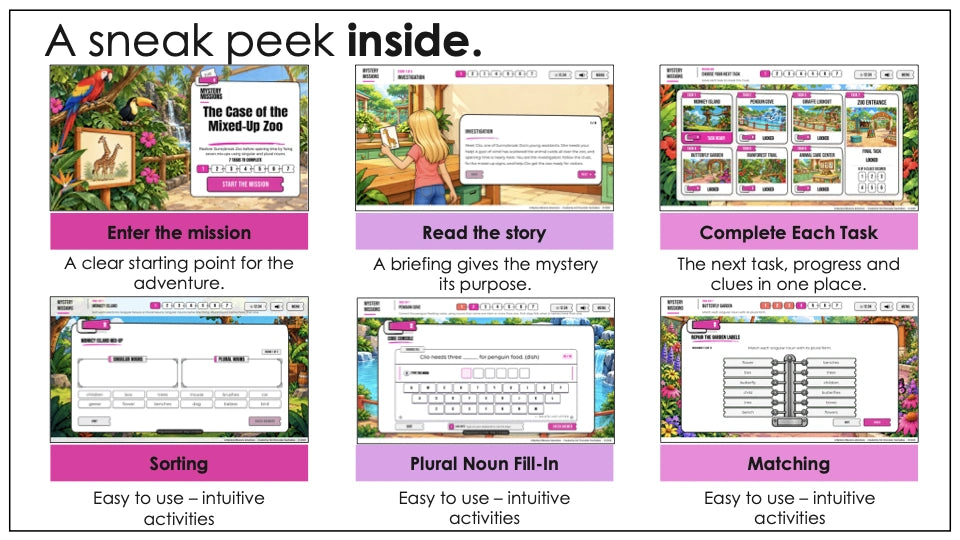
The experience follows a connected sequence:
- Join the class. Students open the student-page address supplied by their teacher, enter the classroom code, and choose a nickname or team name.
- Meet the story. The opening introduces the setting and the problem the class will help solve.
- Complete the challenges. Students move through seven activities, using the mission hub to follow their progress.
- Collect clues. Completing tasks leads to discoveries that connect the language practice to the story.
- Solve the final mystery. Students bring their clues together for the final challenge and reveal the ending.
Activity formats vary by mission. Examples across the series include sorting, picture matching, sentence building, reading questions, decoding, and searching an illustrated scene. Check the individual product previews to see the tasks included in the mission you are considering.

How to set up a Mystery Mission: a teacher’s step-by-step guide
1. Choose and purchase a mission
Browse the Mystery Missions marketplace by skill, grade, topic, or keyword. Open a mission’s details and check the learning focus, reading demands, estimated time, and included resources. Follow the listing’s purchase link to the relevant shop.
Keep the PDF provided with your purchase. It contains the activation code and instructions you need for the next step.
2. Activate the mission with your teacher email
Follow the activation instructions in your purchase PDF. Enter the purchase activation code and your teacher email address, then verify your email using the newest sign-in code sent to you. The activated mission appears in your teacher dashboard.
Use the activation link supplied with your purchase so you arrive at the correct entry page for that mission.
3. Open the dashboard and check your resources
Open the activated mission in your dashboard. Select Resources to find the files provided with that mission. Where worksheets are included, you can use them for additional practice or as a follow-up after the online adventure.
Review the class settings before the lesson. If you want to monitor the session, check that tracking is enabled. Review the timer and available options, and decide what will suit your learners.
4. Generate a classroom code
Choose Generate another classroom code, review the settings, and share the classroom code together with the student-page address shown under How students join. Students need this classroom information to enter the activity.
A classroom code remains active for 72 hours from the time it is created. Check the exact deadline in your dashboard. Once it expires, generate another code for a new session. Progress from the expired session does not transfer to the new code. This classroom window does not expire your purchased teacher license.
5. Help students join and begin
Ask learners to open the address you shared, enter the classroom code, and choose a nickname. Students do not need an email address or student account. Use nicknames or team names rather than real names.
For shared devices, explain who will read, discuss, and enter answers. Rotate those jobs so every learner participates in the language work.
6. Follow progress and check learning
Open Progress Monitoring in your teacher dashboard to review the tracked class session. Alongside that overview, listen to students’ explanations and note a grammar point that needs another example.
End with a new sentence, a short description, or a quick question using the same target language. This provides a useful sample of what students can do after the game.
Three different codes: which one goes where?
| Code | Who uses it? | What it does |
|---|---|---|
| Purchase activation code | The teacher | Adds the purchased mission to the teacher account. |
| Email sign-in code | The teacher | Verifies the teacher’s email during sign-in. |
| Classroom code | Students | Lets students join the class session. |
Share the classroom code and student-page address with your learners. Keep your purchase activation code and email sign-in code for your own teacher access.
Ways to use Mystery Missions in your classroom
Independent grammar review
Use a mission after teaching its target language, when students are ready to read the directions and work with some independence. Keep a small reference available if needed, such as a verb list or a few model sentences. Follow the game with one example that students complete without the reference.
Partner work and small groups
Sharing a device can create useful opportunities to discuss a choice. Ask one learner to read, another to explain the answer, and then agree before entering it. Swap roles regularly. In a larger group, make sure the same confident student is not answering every question.
Teacher-led whole-class practice
Display the mission through a compatible computer connected to an interactive whiteboard. Pause before submitting an answer and give everyone time to think. Students can prepare a response on paper, discuss it with a partner, or explain it aloud when invited.
This format can be helpful when learners need more support with the story or instructions. Use a class or team nickname for the shared activity, and collect individual responses separately when you need evidence from each learner.
A focused review lesson
Build the session around three parts: a short language warm-up, the mission, and a brief independent check. Use the estimated gameplay time on the listing as a starting point and allow additional time for setup, reading support, and discussion. If needed, put the follow-up into your next lesson.
For a simple introduction routine, see 10-Minute ESL Warm-Ups: A Weekly Grammar and Vocabulary Routine.
Which Mystery Mission should you choose?
Start with the language your students need. The theme can then help you connect that practice with their interests or the time of year.
| Mission | Grammar focus | The adventure |
|---|---|---|
| Halloween Mystery | Regular and irregular past tense verbs | Investigate Agatha Moonspell’s missing spellbook. |
| Mission to Planet Zeta | Present continuous: am, is, and are + -ing | Help Pip and Nova at a space station. |
| Pirate Island | Prepositions of place | Join Coco to recover missing map pieces. |
| Zoo Mystery | Regular and irregular plural nouns | Help Nicky and Clio put Sunnybrook Zoo back in order. |
Suggested grades are a guide. For an ESL class, consider students’ reading level, familiarity with the vocabulary, and confidence with the grammar before deciding how much support to provide.
What technology do you need?
Use a desktop computer, laptop, Chromebook, or compatible tablet in landscape orientation, with a reliable internet connection and an up-to-date browser. Gameplay needs a browser window at least 960 pixels wide and 560 pixels high. Phones are not supported for gameplay.
No app installation is required. Students open the student-page address in their browser. Test the device and school network before your lesson so you can check that the page and artwork load correctly.
For current setup guidance, visit the How Mystery Missions Work page or the instructions and troubleshooting guide.
Optional tools for a whole-class review
Affiliate disclosure: As an Amazon Associate I earn from qualifying purchases. This post contains affiliate links. If you buy through them, I may earn a commission at no extra cost to you.
The online missions do not require extra classroom equipment beyond your compatible device and internet connection. If you are adding a separate review activity, Learning Resources Recordable Answer Buzzers can signal a team’s turn after everyone has thinking time. Learning Resources Hand Pointers can help students identify a word or picture detail on the board while explaining an answer. Both are optional additions to your classroom discussion.
Frequently asked questions about Mystery Missions
Are Mystery Missions online games or printable worksheets?
The main activities are online games played in a browser. Your purchase PDF contains activation instructions. Some missions also include optional printable resources; check the listing and the Resources section of your teacher dashboard.
Do students need an email address?
No. Students join with a classroom code and a nickname or team name. The teacher uses email verification to activate and access the teacher account.
Are Mystery Missions suitable for ESL learners?
They can be used for ESL grammar practice when the target language and reading demands suit the class. Preview the vocabulary, model the directions, and use partners or teacher-led play when students need support.
Can students continue a mission later?
Use the same device and browser and follow the mission’s Continue option when available. Keep the active classroom-code deadline in mind, and avoid clearing browser storage or switching domains during a mission. Check the help guide if the session cannot be found.
Can teachers monitor progress?
Yes. Check that tracking is enabled for the classroom, then open Progress Monitoring in the teacher dashboard. Use students’ explanations and a short independent task alongside the dashboard when reviewing their understanding.
How long does a Mystery Mission take?
Estimated gameplay time is listed for each mission and varies with reading level and pace. Plan additional time for joining the class, reviewing the language, and discussing answers. A whole-class guided session may take longer than independent play.
Choose a skill. Share a code. Let the investigating begin.
Mystery Missions gives you a way to connect English practice with an unfolding story. Choose a grammar focus, prepare the language students will need, and decide how they will work together. Then use the adventure as a starting point for careful reading, thoughtful answers, and further speaking or writing.
Explore Mystery Missions and find a digital grammar game for your next lesson.


